ClearTok vs RepostZap: TikTok Repost Removers Compared (2026)
ClearTok vs RepostZap compared (Nov 2026): free daily removals (100–300+ vs 50), keyword & #hashtag filters, Excel/CSV export, and 5-platform support.
TL;DR
- Free daily limit: ClearTok gives you at least 100 free removals per day out of the box (2x RepostZap's 50/day cap), 200/day when you follow @_cleartok on TikTok, and 300+/day with invites or community codes — without watching rewarded ads.
- Filters & history export (not "Limited"): Some comparison tables label ClearTok's filters and export as "Limited." In practice, ClearTok supports 4 rule-based filter types (newest count, video post date, creator, and keyword /
#hashtag) plus free local history export (.xlsxspreadsheet on iOS/Android with direct TikTok video links, and.csvon desktop browsers). - Platform reach: ClearTok runs on iPhone, iPad, Android, Chrome, Microsoft Edge, and Firefox across five official stores. RepostZap is mobile-only (iPhone, iPad, and Android).
- Proven scale & public presence: ClearTok has 1M+ downloads and 76K+ reviews (4.8★) on Google Play, 5.4K+ US App Store ratings (4.7★), 4.9★ on the Chrome Web Store, 1 billion+ reposts removed, and an active official TikTok account (@_cleartok) with over 90,000 followers.
- Where RepostZap fits: Mobile-only users with fewer than 50 reposts who specifically want to tap through a sample-data demo before signing in.
Disclosure & methodology: This comparison is published by the ClearTok team. Competitor specifications, store ratings, and pricing were checked against public App Store, Google Play, browser store listings, and official websites on November 22, 2026. Apps change often — always verify current terms on each provider's listing before purchasing.
What Both Apps Have in Common
TikTok still has no native "Delete all reposts" button. Clearing hundreds of old shares by hand means opening every video, tapping Share → Remove repost, and repeating for hours.
Both ClearTok and RepostZap solve that problem using the same foundational safety model:
- Your password stays with TikTok. On mobile, you sign in on TikTok's own page; on ClearTok's desktop extension, you use the
tiktok.comsession already open in your browser. Neither tool stores your TikTok password. - Local, paced execution. Both automate the standard Remove repost action through your active session with human-like pacing and daily caps designed to reduce rate-limit friction.
- Review before anything is removed on mobile. Both mobile apps scan your Reposts tab first and let you uncheck individual videos before confirming a batch.
The real differences show up in how much you can clean for free, how granular the filters and exports are, whether you can work from a computer, and how battle-tested each product is.
Side-by-Side Comparison (Checked November 2026)
| Feature | ClearTok | RepostZap |
|---|---|---|
| Platforms | iPhone, iPad, Android + Chrome, Edge & Firefox extensions | iPhone, iPad & Android (no desktop or browser version) |
| Base free daily limit | 100 reposts/day | 50 reposts/day |
| Free daily limit with bonuses | 200/day (follow @_cleartok) up to 300+/day (invites / promo codes) | Raised via verified friend invites or rewarded ads |
| Watch ads for extra free removals | Not required | Used alongside invites to earn extra removals |
| TikTok password stored | Never (uses your browser session or TikTok's login page) | Never (uses TikTok's in-app login page) |
| Manual pre-cleanup selection | ✅ Free on mobile — uncheck any repost before confirming | ✅ Free — tick or untick before confirming |
| Rule-based filters (Pro on mobile) | 4 types: newest N, video post date, creator, keyword & #hashtag | 2 types: newest reposts & chosen creators |
| Cleanup history & file export | ✅ Free local history + .xlsx export (mobile) & .csv export (desktop) + 1-tap open original video | ✅ Local cleanup log + .csv export |
| Paid plans (US App Store) | Weekly, Monthly & one-time Lifetime Pro | Weekly ($4.99–$9.99), Max ($14.99–$19.99) & Yearly ($49.99) listed; description also mentions monthly — no lifetime plan listed |
| iOS launch & store ratings (US) | Jan 2026 · 4.7★ (5.4K+ ratings) | Jul 2026 · 4.7★ (2.4K+ ratings) |
| Google Play scale & ratings | 1M+ downloads · 4.8★ (76K+ reviews) | 100K+ downloads · 4.6★ (~8.2K reviews) |
| Desktop browser rating | 4.9★ on Chrome Web Store | Not available on desktop |
| Documented cleanup volume | 1 billion+ reposts removed across 2.2M+ accounts | Not publicly reported |
| Official TikTok presence | @_cleartok (90K+ followers) | No official social account listed |
| Pre-login preview | Guest mode & web Repost Checker | Built-in sample-data demo |
1. Free Daily Allowance: 100–300+ vs 50 per Day
For most people cleaning up an old profile, the free daily cap decides whether the app actually finishes the job without a subscription.
In ClearTok's 1-billion-repost milestone data, the median US account removed 280 reposts (and the average cleared 782). Put those numbers against each free tier:
- With RepostZap (50/day base): Clearing 280 reposts takes 6 separate days, unless you recruit friends with invite codes, watch rewarded ads in the Rewards section, or pay for a subscription. Public App Store and Google Play reviews mention the 50/day base allowance as a limitation; some App Store reviewers also mention ClearTok's higher free allowance.
- With ClearTok (100–300+/day): Every account starts with at least 100 free removals per day — double RepostZap's starting cap. Following ClearTok's official TikTok account @_cleartok adds +100 more every day (200/day total), and invite rewards or community campaign codes push free daily capacity to 300+ reposts/day. A 280-repost cleanup needs 3 daily allowances at the base 100/day, 2 at 200/day, or 1 at 300+/day if those bonuses are active, with no rewarded ads required.
2. Fact-Checking "Limited" Filters and History Export
RepostZap's comparison page marks ClearTok as "Limited" on both keep-filters and removal history export without citing any source. Here is what actually ships inside ClearTok today.
4-Way Repost Filtering (Including Keywords & #hashtags)
In both mobile apps, anyone can manually uncheck reposts in the scanned list for free before tapping confirm. When you want automatic rule-based filters (a Pro feature on mobile in both ClearTok and RepostZap), RepostZap offers two rules: newest reposts and selected creators.
ClearTok goes further with four distinct filter modes:
- Keep newest reposts: Protect your latest N reposts in the exact order TikTok shows them on your profile.
- Filter by video post date: Remove reposts of videos posted older than 1 year, older than 2 years, or a custom date cutoff — with a toggle for undated items.
- Keep by creator: Search across every creator in your scan (sorted by how many times you reposted them) and protect favorite
@handlesin one tap. - Filter by keyword or
#hashtag: Add up to 20 words or#hashtagsand choose either Keep matches (protect reposts mentioning a topic, fandom, or campaign tag) or Remove only matches (target one specific topic without wiping the rest of your tab).
For a step-by-step walkthrough with screenshots, see How to Keep Certain TikTok Reposts When Deleting with ClearTok and Custom Filter: Keep Your Recent TikTok Reposts.
Full Local Cleanup History + Excel (.xlsx) and CSV Export
ClearTok logs every removed repost locally on your device — never hiding your receipts behind a vague summary:
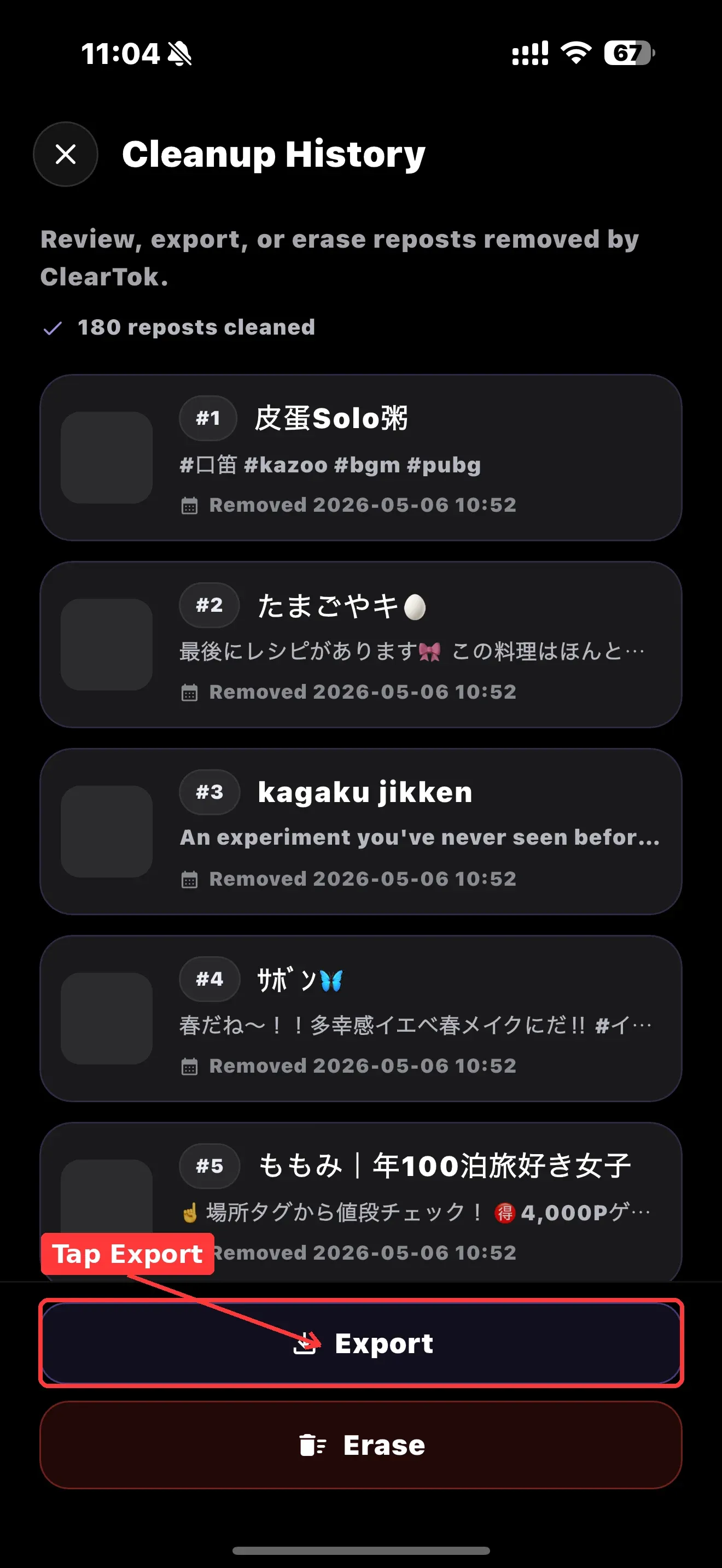
- On iPhone, iPad, and Android: Tap the cleaned pill on the home screen to open Cleanup History. Every row records the thumbnail, creator name and
@handle, caption, content type (Video or Photo), and exact removal timestamp, plus a shortcut icon to reopen the original video directly in TikTok if you ever want to watch or manually re-share it. Tapping Export saves a full Excel spreadsheet (.xlsx) containingRemoved At,Cleanup Batch ID,TikTok Account,Video ID,Creator Handle,Creator Name,Description,TikTok URL, andType— included for free. - On Chrome, Edge, and Firefox: Click Export in the side panel during or after a run to download a clean CSV file of removed repost URLs and metadata.
See the full guide: How to Export TikTok Reposts and Find Removed Videos in ClearTok.
3. Mobile Apps + Official Chrome, Edge & Firefox Extensions
RepostZap only runs on phones and argues in a separate blog post that desktop browser extensions are risky or break whenever TikTok changes its website. It helps to separate unofficial pasted scripts from store-reviewed browser extensions:
- Reuse your TikTok session on desktop: When you install ClearTok from the official Chrome Web Store, Microsoft Edge Add-ons, or Firefox Browser Add-ons, it runs in a side panel right next to the
tiktok.comtab where you are already logged in. You do not even need to log in again inside an embedded mobile WebView. - Remote selector updates: ClearTok's extension updates page selectors remotely when TikTok tweaks its web layout (including Cinema mode across 38 languages), so selector-only fixes can be delivered without a new extension store release. Other changes may still require an extension update.
- One workflow across 5 platforms: Start a cleanup in Chrome, Edge, or Firefox while working on your laptop, or run native scans on iPhone, iPad, and Android from the ClearTok Download page.
4. Track Record, Review Depth & Public Accountability
When connecting a tool to a TikTok account you have built for years, longevity and public accountability matter more than marketing adjectives:
- Longer live track record: ClearTok established the local browser workflow first and launched on the iOS App Store in January 2026 — six months before RepostZap's late-July 2026 release.
- Nearly 10x the Google Play review volume: Both apps hold strong ~4.7★ App Store averages in the US (5,400+ US ratings for ClearTok vs ~2,400 for RepostZap), while on Google Play ClearTok has passed 1,000,000+ installs and 76,000+ user reviews (4.8★) compared with RepostZap's 100,000+ installs and ~8,200 reviews (4.6★) — alongside a 4.9★ rating on the Chrome Web Store.
- 1 billion+ reposts cleaned: Since March 2026 alone, more than 2.2 million TikTok accounts have used ClearTok to remove over 1 billion reposts.
- An active 90K-follower community on TikTok itself: ClearTok operates openly on TikTok at @_cleartok with over 90,000 followers, publishing product walkthroughs, safety tips, and free daily-limit drop codes in public view.
- Flexible pricing when you do upgrade: If you have thousands of reposts and want Pro limits (1,000+/day) and rule-based filters immediately, ClearTok offers weekly, monthly, and a one-time Lifetime Pro purchase — whereas RepostZap only lists recurring subscriptions.
Who Should Pick Which?
Choose ClearTok if you want:
- 100 to 300+ free removals every day without watching rewarded video ads.
- Keyword and
#hashtagfiltering (keep or target specific topics) in addition to creator, newest-count, and post-date rules. - Desktop + mobile flexibility across Chrome, Edge, Firefox, iPhone, iPad, and Android.
- Free spreadsheet/CSV receipts with one-tap links back to the original TikTok videos.
- A one-time Lifetime Pro option instead of recurring-only weekly or annual plans.
- Proven scale backed by 1M+ Play downloads, 1B+ removed reposts, and a 90K-follower official @_cleartok community.
Consider RepostZap if:
- You only ever use iPhone or Android, have 50 or fewer reposts to clear, and want to tap through a built-in sample-data demo before signing into TikTok.
Ready to start? Pick your device on the official ClearTok Download page or check how many reposts are sitting on any public profile first with the free TikTok Repost Checker.
Sources Checked
- RepostZap official website and its ClearTok comparison.
- RepostZap US App Store listing and Google Play listing.
- ClearTok US App Store listing and Google Play listing.
- ClearTok Chrome Web Store listing and official TikTok account.
Store figures are a November 22, 2026 snapshot and can vary by region. App Store purchase listings may include multiple offers; the in-app paywall confirms the available price and billing period.
Related Reading
- How to Export TikTok Reposts and Find Removed Videos in ClearTok
- How to Keep Certain TikTok Reposts When Deleting with ClearTok
- ClearTok Users Have Removed 1 Billion TikTok Reposts
- Is It Safe to Remove All TikTok Reposts?
- ClearTok vs Unrepostify Comparison
FAQ
What is the main difference between ClearTok and RepostZap?
ClearTok gives users a higher free daily allowance (100/day base, 200/day when following @_cleartok, up to 300+/day with bonuses vs RepostZap's 50/day cap), works on both mobile (iOS/Android) and desktop browsers (Chrome, Edge, Firefox), adds keyword/#hashtag and post-date filters, and offers a one-time Lifetime Pro option alongside subscriptions. RepostZap is a mobile-only app launched in July 2026 with a built-in sample demo and recurring Pro plans.
Does ClearTok support keep-filters and cleanup history export?
Yes — claims that ClearTok's filters or exports are "Limited" are outdated or incomplete. Manually unchecking reposts before removal is free, ClearTok Pro on mobile supports four rule-based filters (newest count, video post date, creator, and keyword/#hashtag), and Cleanup History exports a full .xlsx spreadsheet on iOS/Android (plus .csv on Chrome, Edge, and Firefox) for free.
How many reposts can ClearTok remove per day for free compared to RepostZap?
ClearTok removes at least 100 reposts per day for free, rises to 200/day when you follow @_cleartok on TikTok, and can reach 300+/day through invite rewards or promo codes without watching ads. RepostZap starts at 50 free removals per day and relies on friend invites, rewarded ads, or paid Pro plans to raise the cap.
Are ClearTok's Chrome, Edge, and Firefox extensions as safe as a mobile app?
ClearTok's official browser extensions run locally inside your own signed-in tiktok.com tab, never ask for or store your TikTok password, and use adaptive human-like pacing with daily safety caps. Because you are already signed into TikTok in your browser, you do not even have to enter credentials into a separate in-app WebView. Always install from the official Chrome Web Store, Microsoft Edge Add-ons, or Firefox Browser Add-ons links on cleartok.io/download.
Can I switch from RepostZap to ClearTok mid-cleanup?
Yes. Repost removals happen directly on your TikTok profile, so nothing locks your account to one app. Any reposts still sitting on your TikTok Reposts tab will appear when you scan with ClearTok on mobile or desktop.
Comparison based on publicly available store listings and product documentation checked on November 22, 2026. Verify RepostZap's latest pricing and features on its official listing before purchasing. "TikTok" is a trademark of its respective owner. ClearTok is an independent product and is not affiliated with, endorsed by, or sponsored by TikTok or ByteDance Ltd.
Ready to Try ClearTok?
Stop deleting reposts one by one. Get ClearTok and clean up your entire TikTok profile in minutes.
Browser Extension
Mobile App