
Runs Locally on Your Device

repost remover for TikTok — Extension & Mobile App

A free repost remover for TikTok, available on Chrome, Edge, iPhone, and Android. No password, no ads.

Clean up your repost history safely on desktop or mobile — ClearTok works inside your own session, so your password never leaves your device.

Add to Chrome
Also available forEdgeiPhone/iPadAndroid
Safe cleanupPrivate by designBulk Delete All Reposts

Independent tool for TikTok. Not affiliated with or endorsed by TikTok.

Check your public repost count first

Enter a public @username to preview repost insights before cleaning up.

See ClearTok in Action

Watch how ClearTok removes all your reposted videos in minutes — on desktop and mobile.

Desktop Extension

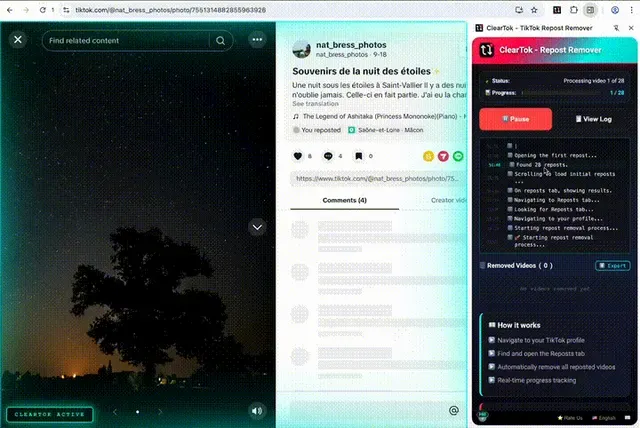
Remove all reposts on Chrome & Edge

ClearTok PC Extension Demo

ClearTok for iOS&Android

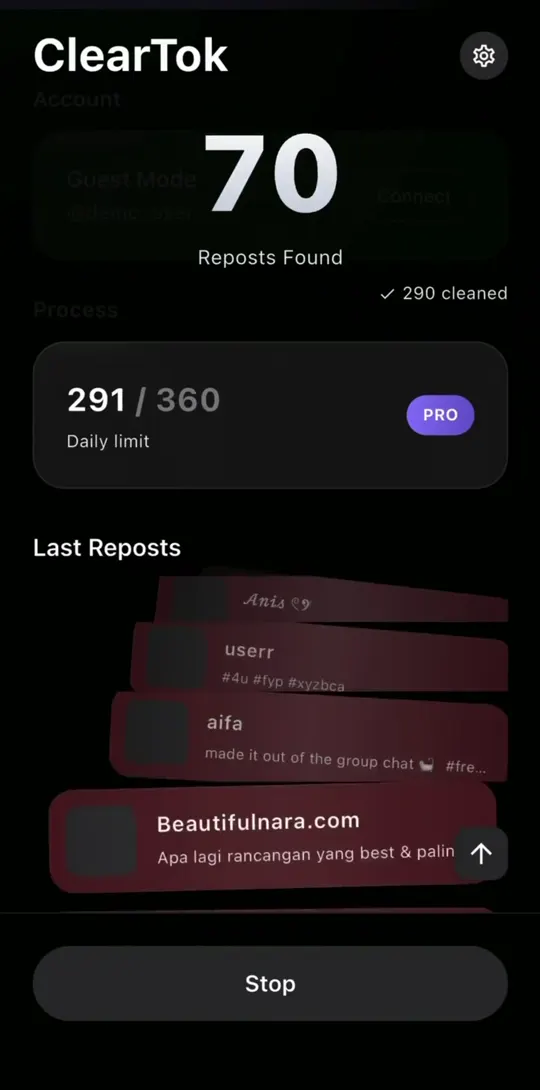
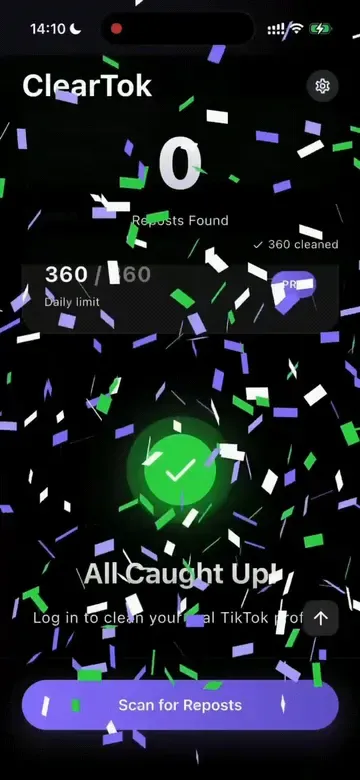
Remove all reposts in minutes — right on your iPhone/Android

ClearTok Mobile App Demo
1

Install ClearTok

Install ClearTok in seconds — available on the Chrome Web Store, Edge Add-ons, and the App Store.

2

Load Your Reposts

Open ClearTok and wait for your reposts to load..

3

Delete in One Click

Click Start once, and ClearTok removes each repost automatically with safe pacing in your own session.

Click to load video

100K+
Trusted by users
5M+
Videos removed
99.9%
Success rate
3Mins
Average Time
!

Mobile Notice

For the browser workflow, visit TikTok.com on desktop in Chrome or Edge. iPhone and iPad users can also use the ClearTok iOS app.

What ClearTok Does

Everything you need to bulk-remove reposted videos from your TikTok profile — fast, safe, and private.

Core

Repost Remover for TikTok

Remove all TikTok reposts in bulk — save hours of manual tapping

Protected

Keep Recent Reposts

Choose to keep your most recent reposts and only remove older ones.

Private

100% Local

ClearTok keeps all actions in your browser session and never asks for your TikTok password

Backup

Export Deleted URLs

Download a complete list of all removed video URLs for your records

Live

Real-time Monitoring

Watch removals in real time with detailed progress and stats — pause anytime.

Safe

Smart Human-Delay

Uses built-in pacing to reduce aggressive action bursts during cleanup

Transparent

Open-Source Transparency

Review the code and privacy approach — ClearTok is open-source on GitHub

Multitask

Background Operation

Continue working while ClearTok removes reposts in the background

Free

Free to Start

Free to delete 100 reposts per day

Want a focused walkthrough? Read our full guide to remove all reposts on TikTok.
Live deletion preview

⏱️ ClearTok Time Estimator

Wondering how long it takes to remove all your reposts?

Quick counts

Actual speed may vary with internet connection and TikTok rate limits.

🚀 With ClearTok

Lightning fast automation

ClearTok finishes in 0.7s

Extension: ~3 sec/video

👆 Manual Deletion

One by one clicking

Manual preview always runs for 3.0s

Manual: ~10 sec/video

Why TikTok Reposts Become a Problem

TikTok makes it easy to repost but gives you no way to unrepost them in bulk. Here's why that matters.

Accidental Reposts

TikTok often prompts reposts with pop-ups — making accidental reposts easy.

Brand Consistency

Off-brand reposts dilute your aesthetic and confuse your audience.

Privacy & Digital Footprint

Quickly remove old or controversial reposts you no longer want tied to your profile.

No Native Bulk Unrepost

TikTok doesn’t offer a “delete all reposts” option. ClearTok automates the standard on-screen steps so you can remove them all in one go.

Three Steps to a Clean Profile

Install ClearTok, open TikTok, and let it handle the rest. Here's the full walkthrough.

Desktop (Extension)

ClearTok runs locally in your browser — no passwords, no external servers, no API access.

  1. 1

    Open TikTok on Desktop

    Go to TikTok.com and sign in on Chrome or Edge.

  2. 2

    Start Cleanup with ClearTok

    Open the ClearTok extension and click "Start" to begin removing reposts.

  3. 3

    Track & Control Progress

    Watch progress in real time — pause anytime and export results when done.

It automates the same on-screen clicks you would do manually, removing reposted videos one by one with human-like pacing to stay within TikTok's limits.

No password requiredNo Data StoredNo API access

Mobile App

ClearTok runs securely on your device — your account stays under your control.

  1. 1

    Open ClearTok & Connect Your Account

    Open the app and securely connect your TikTok account.

  2. 2

    Load & Filter Reposts

    Fetch your reposts and choose to keep recent ones before cleaning.

  3. 3

    Remove & Track Progress

    Remove reposts with real-time progress — pause or adjust anytime.

It performs the same standard actions you would do manually, removing reposts step by step with safe pacing.

Your account stays yoursRuns on your deviceSafe, step-by-step actions

TikTok Repost Help — Step-by-Step Guides

The most-asked questions about TikTok reposts, answered with quick steps for mobile and desktop.

Screenshots

A closer look at ClearTok's interface — from the extension popup to the cleanup dashboard.

Screenshot of the ClearTok browser extension showing automatic removal of all reposted TikTok videos from a profile.

Automated removal of all reposted videos.

Screenshot of ClearTok highlighting one-click bulk removal of every reposted TikTok video.

One-click bulk removal of all reposted videos.

Screenshot of ClearTok's three-step TikTok cleanup flow: connect, start removal, and watch progress.

Watch your TikTok cleanup in action

Screenshot of the ClearTok dashboard with export of deleted repost URLs and background cleanup options.

Export deleted URLs and run in background

Screenshot of a step-by-step guide for using ClearTok to remove TikTok reposts.

How to use ClearTok for TikTok

✨ All features work seamlessly within your Chrome/Edge browser

Background Processing
Real-time Updates
Export Capability

Latest from Our Blog

Stay updated with TikTok tips, tutorials, and insights

How to Export TikTok Reposts and Find Removed Videos in ClearTok
2026-05-21
5 min read

How to Export TikTok Reposts and Find Removed Videos in ClearTok

Open ClearTok, tap the cleaned count to open Cleanup History, then export the list of removed reposts or tap a row to reopen the original TikTok video and repost it manually.

TikTok
ClearTok
Read Article
How to Log in to TikTok with QR Code in ClearTok
2026-05-14
5 min read

How to Log in to TikTok with QR Code in ClearTok

Learn how to connect TikTok to ClearTok with QR Code login. Screenshot the QR code, scan it in TikTok, confirm the login, then scan your reposts.

TikTok
ClearTok
Read Article
ClearTok vs Unrepostify (2026): Which Removes TikTok Reposts Faster & Safer?
2026-05-12
6 min read

ClearTok vs Unrepostify (2026): Which Removes TikTok Reposts Faster & Safer?

Side-by-side comparison of ClearTok and Unrepostify for bulk TikTok repost removal in 2026 — safety controls, custom filters, free limits, ads, platforms, and pricing.

TikTok
Comparison
Read Article

Your Data Stays on Your Device

ClearTok doesn’t store your password or account data. Everything runs locally, using the same standard actions you would perform manually.

No Passwords. No Data Storage.

ClearTok doesn’t store your account data or credentials — everything stays on your device.

Open Source (MIT License)

Fully transparent and available on GitHub for community review.

Easy to Remove

Uninstall anytime — your TikTok account remains unchanged. You can also clear any local data before removing ClearTok.

What Users Are Saying

Verified reviews from Chrome Web Store and App Store users who remove all reposts tiktok with ClearTok.

All shown reviews are 5-star ratings

Geekbarmaster123
Feb 21, 2026
Goated app

"This app is deadass amazing I had like over 5k reposts and I did the log in thing thru there app and it said it was only going to delete 50 and it actually did and when I went back to my account there wasn’t a single repost idk if it was a glitch or wtv but it’s amazing"

View on App Store
BoxMyeshay
Mar 10, 2026
good

"this actually worked way better than i expected. i had hundreds of reposts from years ago and it cleared them pretty fast. i thought i would have to delete them one by one forever lol"

View on App Store
Wisal Oussait avatar
Wisal Oussait
Oct 5, 2025

"In my opinion this is the best i've ever tried. Its amazing and im in love, it works so so good and it's so quick. For sure i would use it forever!!!!"

View on Chrome Web Store
Judy R avatar
Judy R
Jan 15, 2026

"Ça s'est arrêté une fois en plein milieu à cause de ma connexion qui laguait, mais j'ai juste actualisé la page et relancé, et c'est reparti direct là où ça s'était arrêté. Franchement, ça reste mille fois mieux que de devoir supprimer 500 reposts à la main un par un. Si vous avez du ménage à faire sur votre compte, foncez."

View on Chrome Web Store
Barney McKenna avatar
Barney McKenna
Jan 7, 2026

"I kept putting off cleaning my TikTok because un-reposting one by one is a nightmare. This extension is legit a lifesaver. It actually deleted everything in seconds. No bugs, and saved me hours of boring clicking. If you want a fresh start without the headache, seriously just use this."

View on Chrome Web Store
dani maldonano avatar
dani maldonano
Jan 6, 2026

"I’m usually super skeptical about tools that manage social media accounts, but ClearTok is great because it requires no password. Since it runs locally on Chrome, I felt much safer using it compared to those shady apps that ask for your login details. It’s a simple, focused tool that does exactly one thing well without any bloat or hidden costs. Secure, free, and effective—highly recommended."

View on Chrome Web Store

The Fastest & Safest Way to Remove all TikTok Reposts

Here’s how different methods compare — and why ClearTok stands out.

MethodTime Needed for 500 RepostsRiskCost
Manual (phone)~2 hours tappingNoFree
Random "Cleaner" ExtensionUnknownVaries
App (Password Required)Unknown
High
Varies
ClearTok (for TikTok)~8 minutes
Low
Free

Frequently Asked Questions

Common questions about removing TikTok reposts, account safety, and how ClearTok works.

🚀 Basic Features

Essential functions and core capabilities

ClearTok is a TikTok repost remover designed to help you remove all reposts on TikTok quickly and safely. It performs the same standard actions you would normally do manually, so you can clear large repost histories in minutes instead of spending hours removing them one by one.

No. TikTok does not provide a built-in option to delete all reposts at once. If you use TikTok alone, you have to remove reposts manually one by one.

The fastest way is to use a TikTok repost remover like ClearTok. On desktop, install the ClearTok extension and run it on TikTok.com. On mobile, open the ClearTok app and tap Connect TikTok Account, then start the cleanup. For account safety and historical data analysis, ClearTok uses safe pacing and a default batch limit of up to 500 reposts. Eligible users can remove more, and you can pause or cancel at any time.

Yes. ClearTok includes a free plan that lets you remove up to 100 reposts per day. If you need to clean a larger repost history, you can upgrade for higher daily limits.

ClearTok is much faster than manual deletion. Removing reposts by hand can take around 10 seconds per repost, while ClearTok can usually process them in about 3 seconds each, turning hours of work into minutes.

ClearTok can handle large repost histories over time, but it uses controlled batches for account safety. By default, one batch removes up to 500 reposts. Eligible users can remove more, and every user can pause, resume, or cancel during cleanup.

Yes. ClearTok targets only the content in your Reposts tab on TikTok. Your original videos and content you created stay untouched.

No. Removing a repost is silent, and original creators are not notified.

⚡ Advanced Features

Background processing, monitoring & export capabilities

Yes. On desktop, ClearTok can keep working while you use other tabs or continue other tasks. On mobile, you can track progress and manage the cleanup flow from the app.

Yes. ClearTok can generate a report of deleted reposts, including useful details such as video links and timestamps after cleanup is complete.

ClearTok shows live progress, including how many reposts were found, how many were removed, and how the cleanup is progressing.

Yes. ClearTok lets you pause, resume, or stop the cleanup at any time, giving you full control over the process.

Yes. ClearTok can filter your repost list before cleanup, so you can keep recent reposts and remove only older ones.

🔒 Security & Privacy

Account safety and data protection

ClearTok is designed to use standard actions with safe pacing to reduce aggressive activity. It is built to help you clean reposts in a controlled way rather than rushing through actions too quickly.

Yes. ClearTok does not store your password or account credentials, and it does not keep your TikTok account data on external servers.

ClearTok is designed to handle temporary issues such as network interruptions or TikTok action limits. If needed, you can pause the process and continue again later.

If you're unable to log in, it's usually due to temporary TikTok restrictions rather than ClearTok. This can happen after repeated login attempts, VPN usage, frequent IP changes, or switching between devices and tools. To improve your chances of logging in successfully: - Avoid logging in from other apps or tools - Do not switch IP addresses frequently - Avoid using VPNs - Use a stable network Please wait 24 to 72 hours and try again. In most cases, access is restored automatically.

🛠️ Installation & Compatibility

Setup, browser support and technical requirements

For desktop, visit the Chrome Web Store, search for 'ClearTok', and click 'Add to Chrome'. For iPhone and iPad, download the ClearTok app from the App Store.

The ClearTok extension is designed for Chrome and Chromium-based browsers such as Edge, Brave, and Opera. It works directly on TikTok.com in desktop browsers.

Yes. ClearTok is available on iPhone, iPad, and Android.

ClearTok is available as a Chrome and Edge extension for desktop, and as a mobile app on iPhone, iPad, and Android.

ClearTok is a TikTok repost remover extension for Chrome and Edge, built specifically to clean up reposts instead of being a generic account cleaner.

No. ClearTok runs on demand — you start it when needed and can monitor or pause the cleanup at any time.

🆚 ClearTok vs SocialAut

Pricing, platforms (PC vs mobile), safety, and openness

We can only speak for ClearTok. ClearTok is designed around local control, does not store your password, and focuses specifically on TikTok repost cleanup. If safety is your priority, choose tools that minimize account exposure and keep you in control.

ClearTok works on both desktop (Chrome and Edge) and mobile (iPhone, iPad, and Android). SocialAut primarily focuses on mobile workflows, so ClearTok is the better option if you want to remove reposts on a computer while still having mobile access.

ClearTok includes a free plan with up to 100 repost removals per day. Paid options may be available for users who need higher limits.

🏆 Comparison & Advantages

How ClearTok stands out from alternatives

ClearTok combines repost removal, live progress tracking, pause-and-resume controls, export support, and filtering options in one focused workflow. It is built specifically for TikTok repost cleanup rather than generic account cleaning.

No. ClearTok only works on your own repost history. It cannot remove reposts or content from another user's TikTok account.

Ready to Start Fresh?

Install ClearTok and remove all your TikTok reposts in minutes — free, private, and open-source.

No sign-up • Instant install • Works worldwide

100% Secure
Open Source
Privacy First