
How to Delete All Reposts on TikTok at Once
TikTok has no built-in bulk-delete. Here's how to delete all TikTok reposts at once with free tools on Chrome, Edge, iPhone, iPad, or Android.
How to Delete All Reposts on TikTok at Once (Quick Answer)
TikTok does not have a native "Delete All Reposts" button. The fastest way to delete all reposts at once is ClearTok — open the bulk Remove All Reposts on TikTok page, install ClearTok for your device, sign into TikTok, and tap Start. It's free on every device:
- Chrome / Edge — install the ClearTok browser extension from the Chrome Web Store or Microsoft Edge Add-ons.
- iPhone / iPad — install the ClearTok app from the App Store.
- Android — install the ClearTok app from Google Play.
Each version automates the official Share → Remove Repost click with safe pacing. The free plan removes 50–100 reposts per day, and no password is required.
For step-by-step instructions, continue reading below.
If you want a visual walkthrough, watch: How to Delete All TikTok Reposts - Complete Tutorial
The 2026 Reality: No Native "Delete All"
TikTok does not currently provide a built-in option to delete all reposts at once. That means you have two practical paths today:
- Request the feature from TikTok support.
- Use the manual repost removal flow (one by one).
Method 1: Request the Feature from TikTok Support
If you want TikTok to add a bulk delete option, here is the fastest request flow:
- Open TikTok -> Profile -> menu icon.
- Go to Settings and privacy -> Report a problem.
- Choose any topic -> tap "No" -> tap "Need more help".
- Send a short request like: "Please add a bulk delete reposts option."
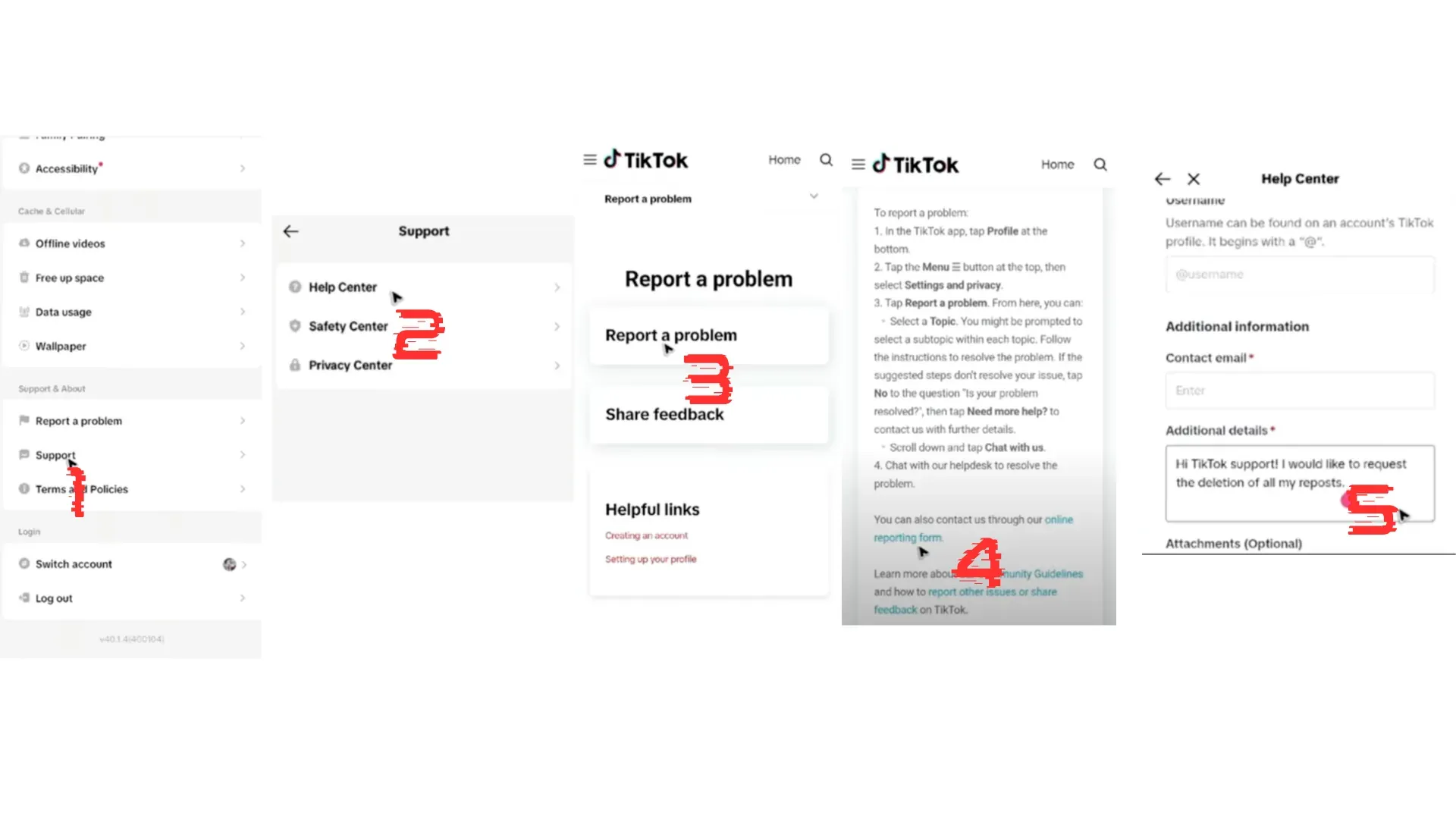
TikTok may acknowledge the request but will still point you to manual deletion for now.
Method 2: Manual Deletion (Official Flow)
To remove a single repost:
- Open the reposted video.
- Tap Share.
- Tap Remove Repost.
Repeat for each repost you want to remove. This is the official method and works on mobile and desktop.
Method 3: Bulk Cleanup with ClearTok (Desktop or Mobile)
If you have a large backlog, ClearTok handles it on whichever device you prefer. There is no "you must use desktop" — every version below performs the same end-to-end bulk delete:
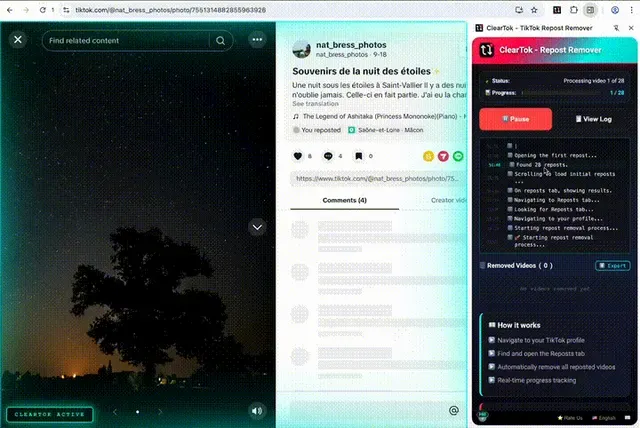
Desktop — Chrome and Edge extension
- Runs inside your logged-in TikTok.com session.
- Uses visible UI clicks (no private APIs).
- Adds human-like delays and auto-pause to reduce rate limits.
- Creates an exportable log of what was removed.
iPhone and iPad — ClearTok iOS app
- Free download from the App Store.
- Runs the cleanup directly on your phone using your existing TikTok session — no desktop, no laptop required.
- Same safe pacing and progress controls as the extension.
Android — ClearTok app on Google Play
- Free download for Android phones and tablets.
- Same bulk-delete flow as the iOS app, with pause / resume / progress export.
Limitations to Know
- If TikTok hides your Reposts tab during UI tests, none of these versions can access it (this is a TikTok-side restriction, not a ClearTok limitation).
- Very large cleanups should be done in batches with short breaks regardless of device.
- ClearTok only removes reposts, not your original uploads.
Tips to Avoid Rate Limits
- Remove reposts in batches (200-500 at a time).
- Keep the TikTok tab focused.
- If actions slow down, pause and resume later.
2026 Status Check: What's Actually Different This Year
If you searched "how to delete all reposts 2026," here is what has and hasn't changed since the last cycle of TikTok updates:
- Still no native bulk delete. As of September 2026, TikTok's help page on reposts lists only one-at-a-time ways to remove a repost. There is no "Delete all reposts" or select-all option.
- Reposts tab is visible on public profiles. On a public account, your reposts show on the Reposts tab for everyone. On a private account, your followers see them on your profile and in their For You feed. Desktop bulk tools rely on that tab.
- Three official removal paths on mobile. Share → Delete repost, press and hold the video → Remove repost, or tap your profile photo on the reposted video → Remove. All three remove one repost at a time.
- Reposts now have replies. Other people can reply to your reposts, and your comment privacy settings don't apply to those replies. Removing a repost deletes its replies too. See TikTok repost replies explained.
- Safe pacing in 2026. Internal benchmarks show ~50 removals per 15 minutes is the sustained ceiling without throttling. Pushing past that triggers a soft cooldown (no error, just silent slowdowns) — ClearTok auto-detects and pauses.
- No notifications. Removing a repost still does not notify the original creator, your followers, or anyone tagged in the video. This was confirmed against 2026 release notes and behaves the same in test accounts.
If TikTok ever does ship a native bulk delete, this section is where we'll log the change first.
FAQ
Can I delete all reposts at once on TikTok? Not natively. TikTok does not offer a delete-all button as of 2026.
Will removing a repost delete the original video?
No. It only removes your repost; the original remains.
Is there a safe bulk method?
Look for local, browser-based tools that do not ask for your password and respect rate limits.
Can I do this on mobile? Yes — fully. The native TikTok app forces one-by-one removal, but the free ClearTok app on iPhone, iPad, and Android performs the same automated bulk delete as the desktop extension. You don't need a computer.
Conclusion
There is still no official bulk delete feature, but you can remove reposts manually today and request the feature from TikTok. If you need a faster workflow, a browser-based tool can help you clean up in minutes instead of hours.
Ready to clean up faster? Try ClearTok — free, runs locally on your device, no password required. Available on Chrome, Edge, iPhone, iPad, and Android.
Related Guides
Ready to Try ClearTok?
Stop deleting reposts one by one. Get ClearTok and clean up your entire TikTok profile in minutes.
Browser Extension
Mobile App