
TikTok Repost Checker & Counter
Check any TikTok profile's repost count, trends, and analytics instantly.
Paste a @username or TikTok profile link. We'll count reposts, surface caption keywords, show repost timing, and highlight creators you keep boosting. No password needed.
Free public TikTok analysis
What is ClearTok Repost Insights?
ClearTok Repost Insights is a free TikTok repost checker and counter for public profiles. TikTok never shows a repost total anywhere in the app, so paste your own @username — or any public profile — to see repost count, repost timing, creator patterns, recent reposts, and caption-level topic signals in one place.
Repost count
See how many reposts a profile currently has without manually opening the Reposts tab and counting by hand.
Repost rhythm
Spot when reposting activity clusters by month or year so you can tell whether someone reposts occasionally or in streaks.
Top creators and topics
See who appears most often in reposts and which words dominate descriptions, tags, and repeated themes.
Recent repost examples
Open the most recent repost entries to understand tone, engagement, and what the account is currently amplifying.
Guided walkthrough
How to use the repost checker
The screenshots below show the exact flow on ClearTok. The goal is not just to get a number, but to quickly understand what a repost profile is about.
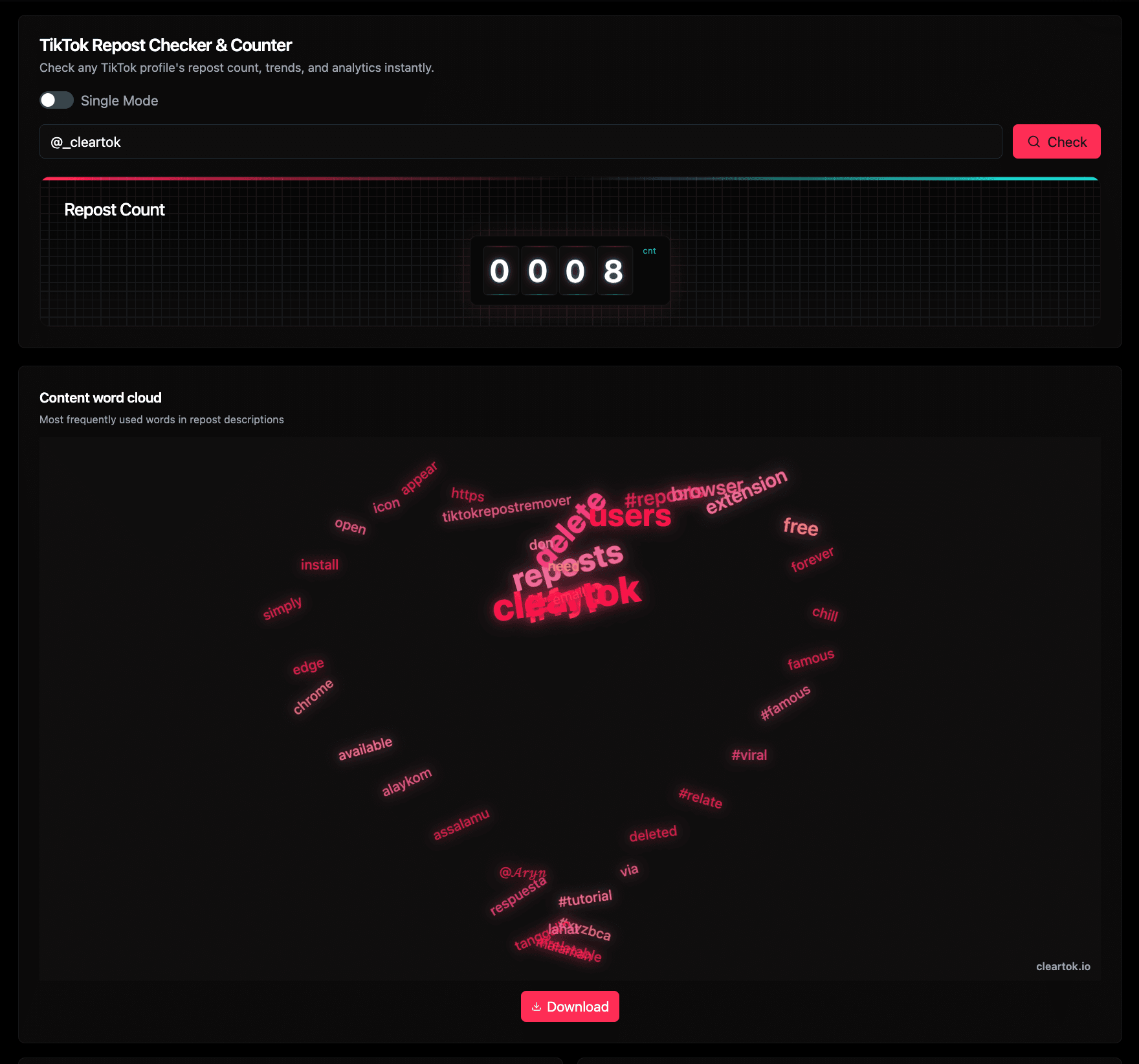
1. Run a check and read the first summary view
Enter a TikTok profile URL or @username, then click Check. The first result block gives you the repost count and the content word cloud, which is often the fastest way to understand recurring topics, fandoms, and campaign language.
- Use a public profile such as @_cleartok as a sample input.
- The rolling counter shows the current repost total.
- The word cloud surfaces repeated words from repost captions and tags.
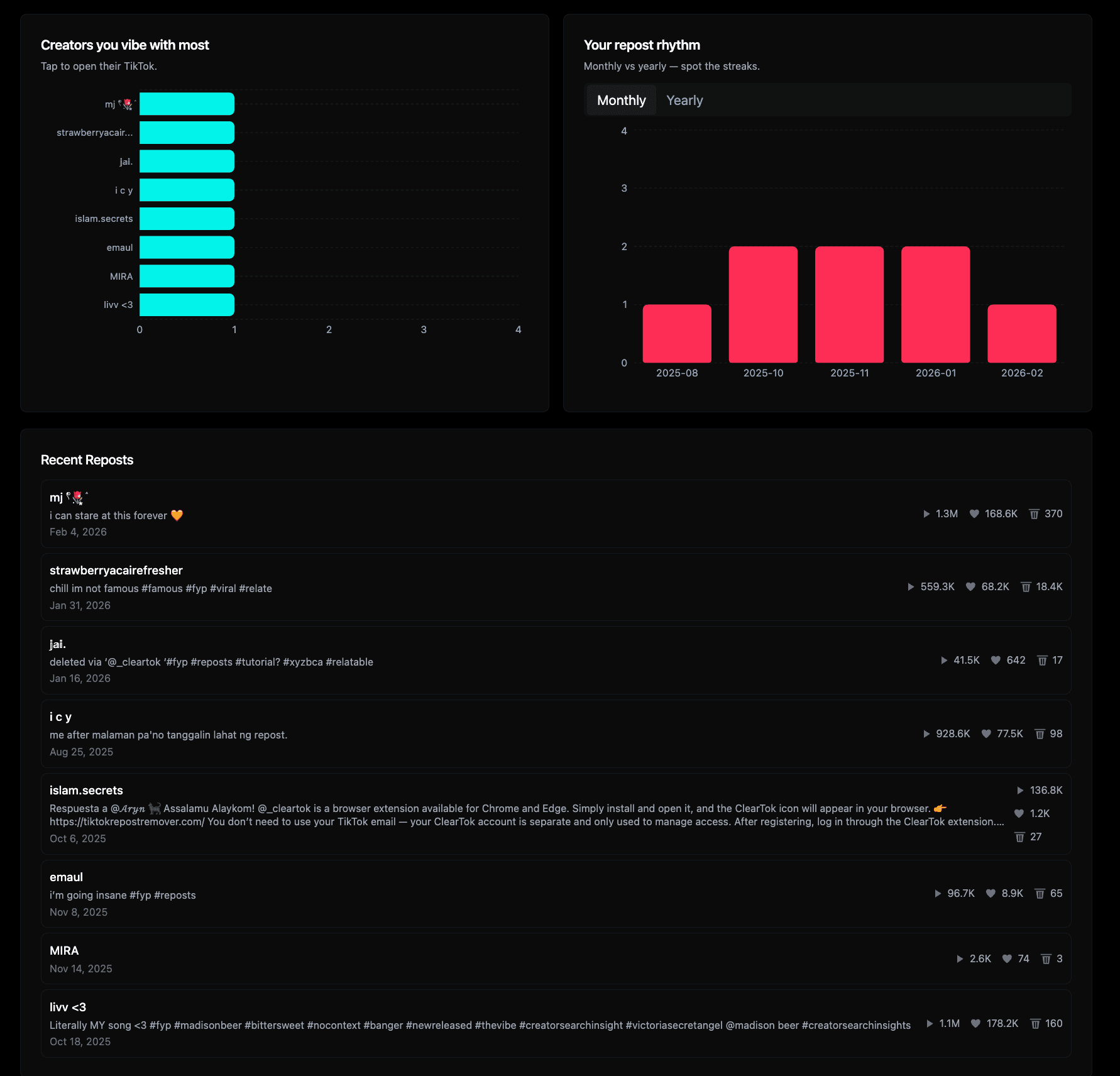
2. Scroll down to interpret behavior, creators, and recency
After the headline numbers, the analytics modules explain the account's repost behavior in context. Use the creators chart to see repeated affinities, the rhythm chart to spot bursts, and the recent repost list to inspect the latest examples one by one.
- Top creators show which accounts are reposted most often.
- Monthly and yearly rhythm help you spot streaks or dormant periods.
- Recent reposts give you clickable examples with play, like, and comment signals.
Search intent coverage
What you can learn from a repost profile
Search Console shows that people come here with a few recurring jobs in mind: checking repost counts, understanding repost patterns, and deciding how to remove reposts at scale. This page is built to answer those jobs without forcing users into a raw spreadsheet.
Check repost count fast
For searches like these, the page gives an immediate count plus a visual sanity check from the profile's latest repost behavior.
Audit before deleting reposts
These searches usually mean users want to measure backlog size first, then decide whether to clean up manually or switch to ClearTok Remover.
Find the right ClearTok workflow
Branded searchers usually want both insight and action. This checker handles the audit; the remover product handles the bulk cleanup.
See the same need across languages
The same pattern shows up globally. Users in multiple markets still check repost history first, then look for the safest way to remove reposts.
Ready to move from insight to action?
Use the checker to understand backlog size and creator patterns, then switch to the remover workflow when you are ready to clean everything up.
How the count is calculated
What a TikTok repost count can and cannot tell you
ClearTok counts the reposts that are publicly visible on a profile's Reposts tab at the moment you run the check. That makes the number reliable as a current snapshot, but it is not a lifetime archive — and it is worth knowing where the boundaries are before you act on it.
| Signal | What it helps you understand | What it does not prove |
|---|---|---|
| Total repost count | How active a profile is in reposting public videos right now. | That every historical repost is still accessible. Reposts of deleted or restricted videos drop out of the public tab. |
| Repost rhythm | Whether reposting happens steadily or in bursts. | Why the person reposted, or how deliberate the timing was. |
| Top creators | Which creators appear most often in the profile's reposts. | A partnership, sponsorship, or any formal relationship. |
| Word cloud | Repeated topics, fandoms, locations, or product terms in captions and tags. | Exact audience intent behind those topics. |
| Recent reposts | What the profile is amplifying at the moment. | A complete view — private or unavailable activity stays hidden. |
Two results commonly surprise people. A capped total (for example 100+) means ClearTok found at least that many visible reposts before hitting the current counting limit — read it as a lower bound, not a final figure. And a number that disagrees with the TikTok mobile app is usually the app's cache lagging behind: ClearTok reads the live Reposts tab as it stands now.
FAQ
Questions people ask before using a repost checker
These answers are written around the real search intent we see most often: counter, checker, remover, and cleanup queries.