
TikTok Repost စစ်ဆေးသူနှင့် ရေတွက်သူ
TikTok profile URL, @username, သို့မဟုတ် username ရိုက်ထည့်ပြီး ၎င်းတို့၏ repost insight များနှင့် analytics များကို ချက်ချင်း ကြည့်ပါ။
@username ဒါမွမဟုတ္ TikTok link ကို paste လုပ္လိုက္ရံုနဲ႔ repost အေရအတြက္၊ မၾကာခဏထပ္ခါထပ္ခါေပၚတဲ့စကားလံုးေတြ၊ ဘယ္အခ်ိန္မွာ repost ပိုလုပ္လဲ၊ ဘယ္ creator ေတြကို အမ်ားဆံုး boost လုပ္လဲဆိုတာ ျမင္ႏိုင္ပါတယ္။ Password မလိုပါဘူး။
အမ်ားပြင့္ TikTok profile အတြက္ အခမဲ့ analysis
ClearTok Repost Insights ဆိုတာ ဘာလဲ
ClearTok Repost Insights က အမ်ားပြင့္ TikTok profile ေတြအတြက္ အခမဲ့ repost checker နဲ႔ counter ပါ။ Profile URL ဒါမွမဟုတ္ @username ကို paste လုပ္လိုက္တာနဲ႔ repost စုစုေပါင္း၊ repost rhythm၊ ခဏခဏ ျပန္ေပၚတဲ့ creator ေတြ၊ recent repost ေတြနဲ႔ caption / hashtag theme signal ေတြကို တစ္ေနရာထဲမွာ ျမင္ရပါတယ္။
Repost အေရအတြက္
Reposts tab ကို လက္နဲ႔ဖြင့္ျပီး တစ္ခုခ်င္း မေရရဘဲ profile တစ္ခုမွာ repost ဘယ္ေလာက္ရွိလဲ ခ်က္ခ်င္း သိႏိုင္ပါတယ္။
Repost rhythm
Account က burst ပံုစံလား၊ season အလိုက္လား၊ ဒါမွမဟုတ္ ရံဖန္ရံခါပဲ repost လုပ္လား ဆိုတာ ျမန္ျမန္ဖမ္းလို႔ရပါတယ္။
Top creator နဲ႔ theme
ဘယ္ account ေတြ ထပ္ခါထပ္ခါ ျပန္ေပၚေနလဲ၊ caption/tag ေတြထဲမွာ ဘယ္စကားလံုးေတြ အဓိက dominate လုပ္ေနလဲ ျမင္ရပါတယ္။
Recent example
အခုတေလာ repost လုပ္ထားတာေတြကို ဖြင့္ၾကည့္ျပီး tone၊ engagement နဲ႔ account က ဘာကို amplify လုပ္ေနလဲ သိႏိုင္ပါတယ္။
Screenshot နဲ႔ guide
Repost checker ကို ဘယ္လိုသံုးမလဲ
ေအာက္က screenshot ေတြက ClearTok ထဲက တကယ့္ flow ကို ျပထားတာပါ။ ဂဏန္းတစ္လံုးရတာထက္ profile ရဲ႕ vibe ကို ျမန္ျမန္ဖတ္ႏိုင္ဖို႔ အဓိကထားထားပါတယ္။
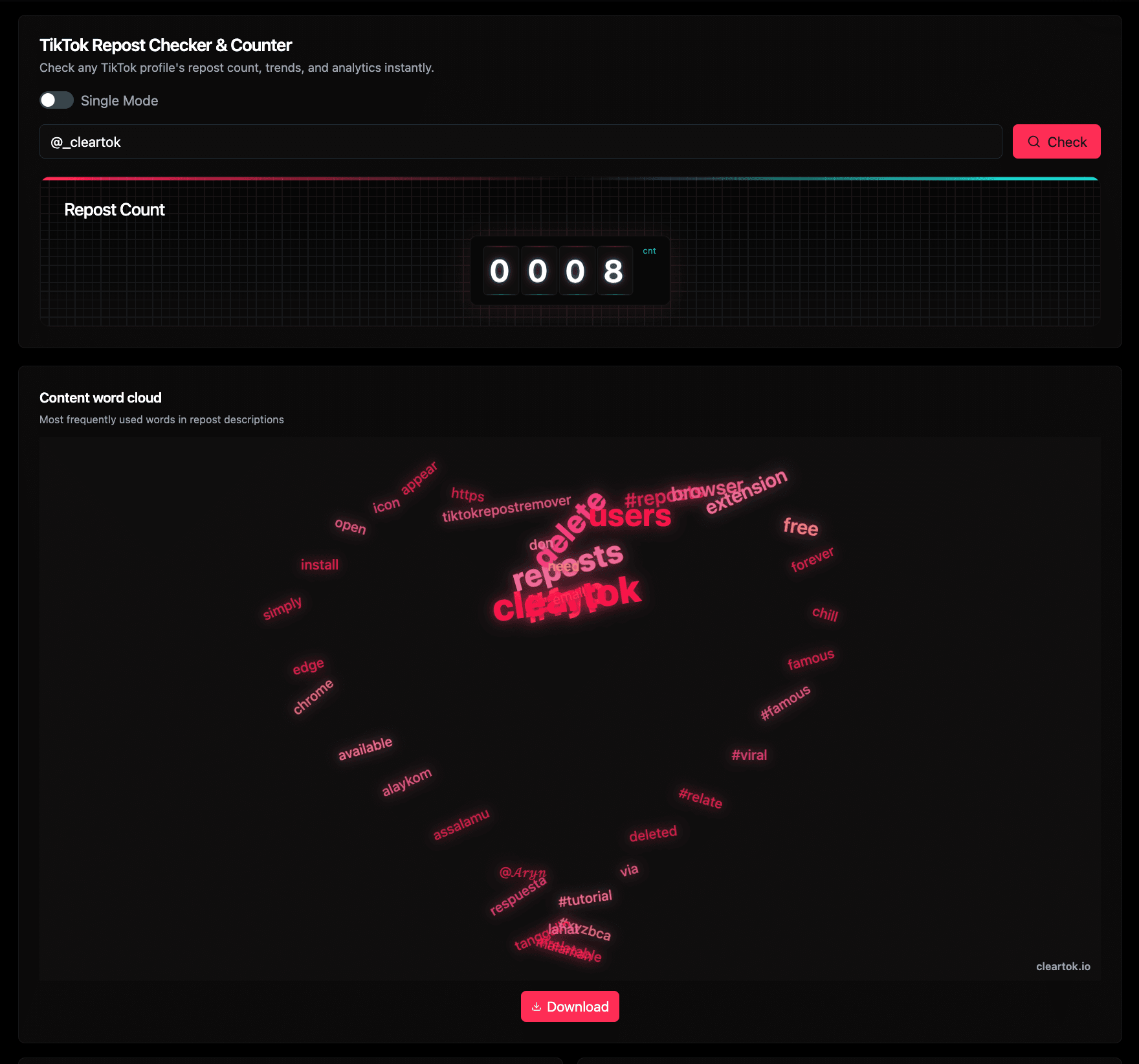
1. Check ကို run ျပီး ပထမ summary view ကိုဖတ္ပါ
Profile URL ဒါမွမဟုတ္ @username ကို paste လုပ္ျပီး Check ကိုႏွိပ္ပါ။ ပထမ block မွာ repost count နဲ႔ word cloud ပါလာျပီး repeated topic၊ fandom နဲ႔ language pattern ေတြကို အျမန္ဆံုးဖမ္းႏိုင္ပါတယ္။
- @_cleartok လို public profile နဲ႔ စမ္းႏိုင္ပါတယ္။
- Rolling counter က လက္ရွိ repost total ကို ျပပါတယ္။
- Word cloud က caption နဲ႔ tag ေတြထဲက မၾကာခဏ ထပ္လာတဲ့ စကားလံုးေတြကို စုျပထားပါတယ္။
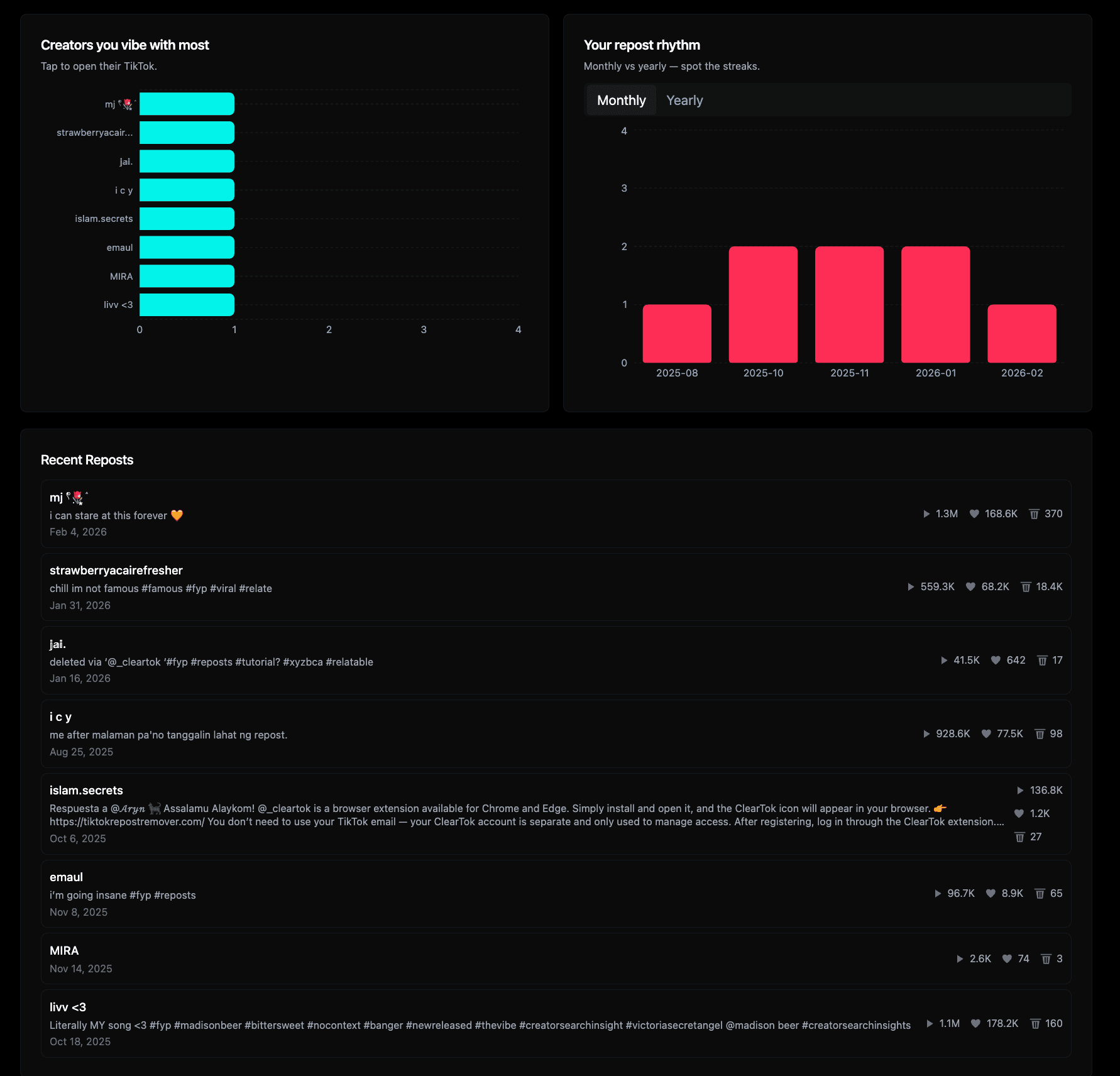
2. ေအာက္ကိုဆင္းျပီး behavior၊ creator နဲ႔ recency ကိုဖတ္ပါ
Main number ျပီးရင္ analytics module ေတြက context ေပးပါတယ္။ Creator chart က repeated affinity ေတြကို၊ monthly/yearly rhythm က peak ေတြကို၊ recent reposts list က တကယ့္ example ေတြကို ျပပါတယ္။
- Top creators က ဘယ္ account ေတြ အမ်ားဆံုး ျပန္ေပၚလဲ ျပပါတယ္။
- Monthly နဲ႔ yearly rhythm က streak နဲ႔ break ေတြကို ျမင္ေစပါတယ္။
- Recent reposts က play, like, comment ပါတဲ့ clickable example ေတြေပးပါတယ္။
တကယ့္ search intent
Repost မ်ားတဲ့ profile တစ္ခုကေန ဘာေတြဖတ္ႏိုင္လဲ
Search Console data အရ လူေတြက ဒီ page ကို အဓိက အရာသံုးခုအတြက္ ဝင္လာပါတယ္။ repost အေရအတြက္ သိခ်င္တယ္၊ pattern ဖတ္ခ်င္တယ္၊ ျပီးရင္ ဘယ္လိုရွင္းမလဲ ဆံုးျဖတ္ခ်င္တယ္။ ဒီ page က အဲဒီ flow ကိုပဲ တိုက္ရိုက္ေျဖထားပါတယ္။
Repost အေရအတြက္ကို ျမန္ျမန္သိခ်င္တယ္
ဒီ search ေတြက အျမန္အေျဖလိုခ်င္ရံုမဟုတ္ဘဲ profile က repost heavy လားဆိုတာ visual နဲ့ confirm လုပ္ခ်င္တာပါ။
ဖ်က္မယ္ဆိုရင္ audit အရင္လုပ္ခ်င္တယ္
ဒီေနရာမွာ backlog ပမာဏကို သေဘာေပါက္ျပီး manual cleanup သြားမလား၊ ClearTok Remover သြားမလား ဆံုးျဖတ္တာက အဓိကပါ။
ClearTok flow မွန္မွန္ေရြးခ်င္တယ္
Brand search ေတြက insight နဲ႔ action ႏွစ္ခုလံုးလိုတာမ်ားပါတယ္။ Checker က audit အလုပ္ကို၊ remover က bulk cleanup ကိုယူပါတယ္။
ဘာသာစကားမတူလည္း လိုအပ္ခ်က္က အတူတူပဲ
Market အမ်ားစုမွာ pattern တူပါတယ္။ အရင္ repost history စစ္မယ္၊ ျပီးရင္ အလံုျခံဳဆံုး remove လုပ္မယ့္နည္းကို ရွာမယ္။
Insight ကေန cleanup ကို ဆက္သြားဖို႔ အဆင္သင့္လား
Checker ကို သံုးျပီး volume နဲ႔ pattern ကို အရင္ဖတ္ပါ။ ျပီးရင္ တစ္ခါတည္းရွင္းခ်င္ရင္ ClearTok Remover flow ကို ဆက္သြားႏိုင္ပါတယ္။
FAQ
Repost checker သံုးခါနီး မၾကာခဏေမးတဲ့ ေမးခြန္းမ်ား
ဒီအေျဖေတြကို counter, checker, remover နဲ႔ cleanup search intent အစစ္အမွန္အေပၚ အေျခခံျပီးေရးထားပါတယ္။