
TikTok Post Insights နှင့် ရေတွက်သူ
မည်သည့် public TikTok profile ၏ post အရေအတွက်၊ content pattern နှင့် engagement trend များကို စစ်ဆေးပါ။
@username ထည့်ရုံနဲ့ total posts, keyword pattern, posting rhythm, engagement trend နဲ့ recent posts တွေကို password မလိုဘဲ ကြည့်နိုင်ပါတယ်။
Public TikTok post analysis အခမဲ့
ClearTok Post Insights ဆိုတာဘာလဲ
ClearTok Post Insights က public TikTok profiles အတွက် အခမဲ့ checker တစ်ခုပါ။ URL ဒါမှမဟုတ် @username ကို paste လုပ်လိုက်တာနဲ့ total posts, keywords, engagement, posting rhythm နဲ့ recent uploads ကို တစ်နေရာတည်းမှာ မြင်နိုင်ပါတယ်။
Total posts
Profile ကို အောက်ကိုရှည်ရှည် scroll မလုပ်ဘဲ မြင်ရတဲ့ post စုစုပေါင်းကို ချက်ချင်းကြည့်နိုင်ပါတယ်။
Posting rhythm
Monthly / yearly view နဲ့ account က steady တင်နေလား၊ burst နဲ့တင်နေလားဆိုတာ မြင်ရပါတယ်။
Engagement trends
Play နဲ့ like တွေ အချိန်လိုက် ဘယ်လိုရွေ့လဲဆိုတာ compare လုပ်ပြီး ဘယ်အချိန် performance တက်လဲ ဖတ်နိုင်ပါတယ်။
Content signal နဲ့ recent example
Word cloud နဲ့ recent posts list က theme, wording နဲ့ creative direction ကို မြန်မြန်ဖတ်လို့ရစေပါတယ်။
အသုံးပြုပုံအကျဉ်း
Post insights checker ကိုဘယ်လိုသုံးမလဲ
ဒီစာမျက်နှာကို layer လိုက်ဖတ်ရင် အဆင်ပြေပါတယ်။ အရင် total post နဲ့ word cloud, ပြီးမှ rhythm နဲ့ engagement, နောက်ဆုံး recent posts နဲ့ context ကိုဖတ်ပါ။
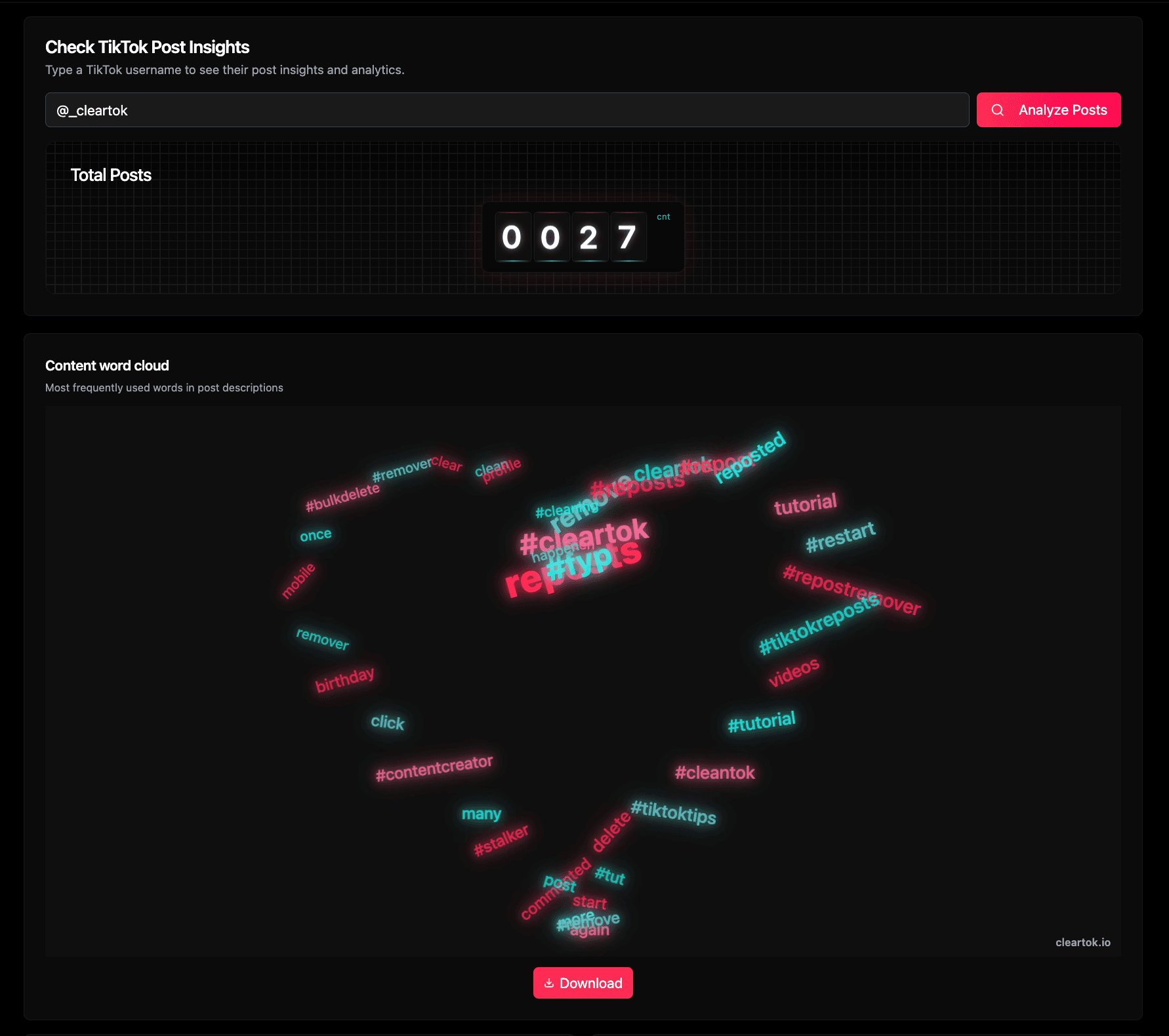
1. Check run လုပ်ပြီး ပထမ snapshot ကိုဖတ်ပါ
TikTok URL ဒါမှမဟုတ် @username ကိုထည့်ပြီး Analyze Posts ကိုနှိပ်ပါ။ ပထမ block က total posts ကိုပြပြီး word cloud က repeated theme, phrase နဲ့ hashtag တွေကို ချက်ချင်းဖော်ပြပေးပါတယ်။
- စမ်းချင်ရင် @_cleartok လို public profile နဲ့စမ်းလို့ရပါတယ်။
- Counter က အခုမြင်ရတဲ့ total posts ကိုပြပါတယ်။
- Word cloud က repeated topic နဲ့ content language ကို စက္ကန့်ပိုင်းအတွင်းဖတ်လို့ရစေပါတယ်။
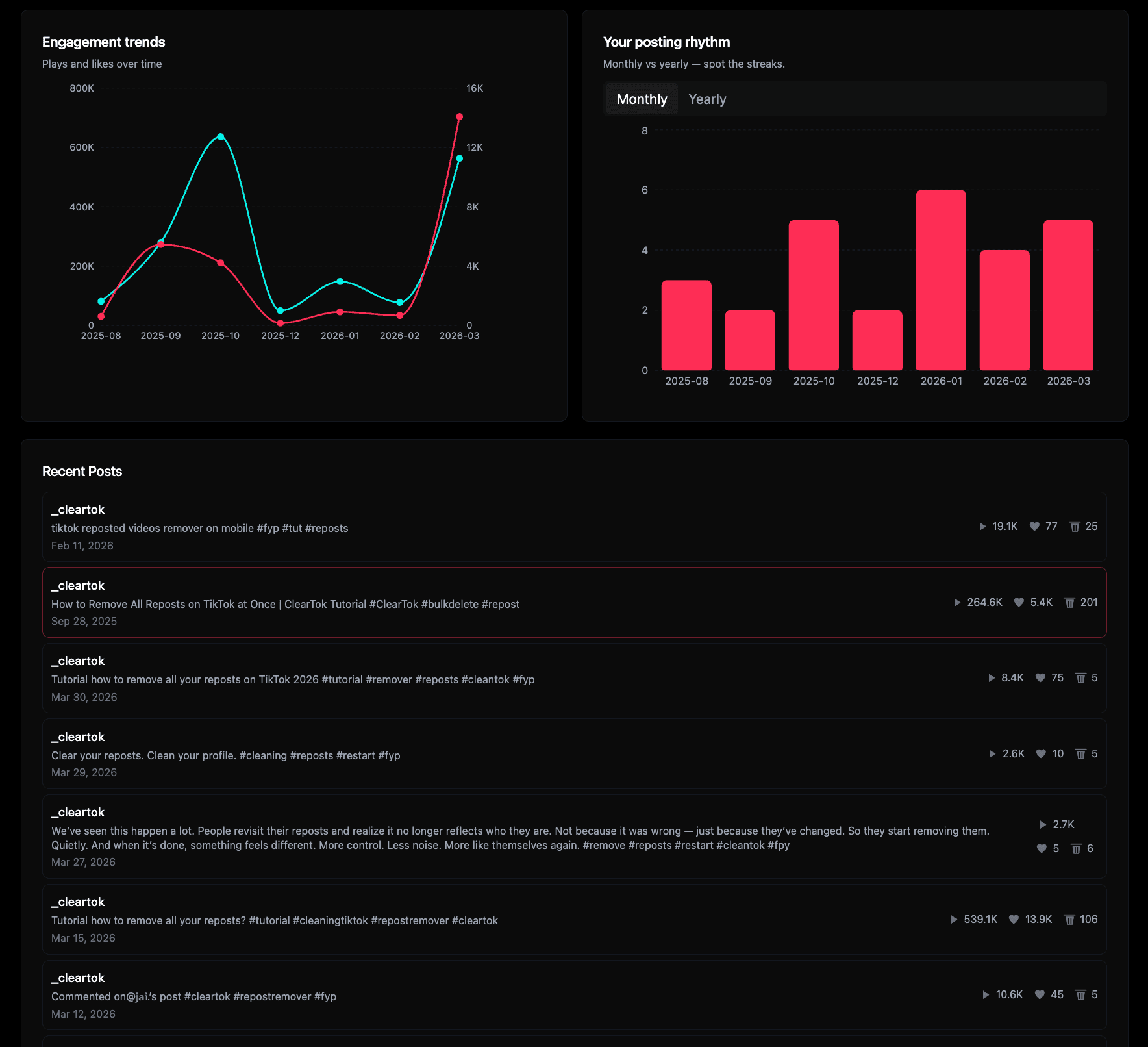
2. Scroll လုပ်ပြီး rhythm, performance နဲ့ recent posts ကိုဖတ်ပါ
Overview ပြီးရင် analytics modules က account ဘယ်လို move လုပ်လဲဆိုတာပြပါတယ်။ Engagement trends က plays နဲ့ likes တက်ပုံကို၊ posting rhythm က streak နဲ့ quiet period ကို၊ recent posts ကတော့ concrete example ကိုပြပါတယ်။
- Engagement trends က plays နဲ့ likes ကို time အလိုက် compare လုပ်ပေးပါတယ်။
- Monthly / yearly rhythm နဲ့ streak တွေက ရှင်းရှင်းလင်းလင်းမြင်ရပါတယ်။
- Recent posts က caption, topic နဲ့ performance ကို စာမျက်နှာမထွက်ဘဲ စစ်နိုင်စေပါတယ်။
ဒီစာမျက်နှာကဖြေရှင်းပေးတဲ့ job များ
TikTok post profile ကနေ ဘာတွေသိနိုင်လဲ
User အများစုက ဒီနေရာမှာ မေးချင်တာ ၄ ခုပဲ ဖြစ်ပါတယ်။ ဒီ account က ဘယ်လောက်တင်လဲ၊ ဘာအကြောင်းအရာတင်လဲ၊ streak နဲ့တင်လား၊ ဘယ် post တွေက views / likes တကယ်ရလဲ ဆိုတာပါ။
Post count ကိုမြန်မြန်သိချင်သူ
Counter intent အတွက် စာမျက်နှာက total posts နဲ့ first summary ကို အပေါ်မှာတင်ပြထားပါတယ်။
Theme နဲ့ caption language ကိုဖတ်ချင်သူ
Word cloud က creator ဘာပြောနေတယ်၊ ဘယ် hashtag တွေထပ်နေတယ်၊ content framing ဘယ်လိုလဲဆိုတာ မြန်မြန်ဖော်ပြပေးပါတယ်။
Rhythm နဲ့ engagement pattern ကိုမြင်ချင်သူ
Charts တွေက performance က ဘယ်ကာလမှာစုလဲ၊ posting cadence က steady လား bursty လားဆိုတာပြပါတယ်။
Post analysis ကနေ account audit အပြည့်သို့ဆက်ချင်သူ
Post Insights က account ဘာ publish လုပ်လဲဆိုတာပြပါတယ်။ Repost behavior ကိုလည်းဖတ်ချင်ရင် သို့မဟုတ် repost cleanup လုပ်ချင်ရင် Repost Insights / Remover ဆက်သုံးနိုင်ပါတယ်။
Repost ဘက်ကိုပါကြည့်ချင်ပါသလား
Post insights က account ဘာတင်လဲဆိုတာပြပါတယ်။ Repost insights က ဘာကို amplify လုပ်လဲဆိုတာပြပါတယ်။ နှစ်ခုလုံးပေါင်းကြည့်ရင် profile ကိုပိုပြီးပြည့်ပြည့်စုံစုံဖတ်နိုင်ပါတယ်။
FAQ
Post insights checker မသုံးခင် လူတွေမေးလေ့ရှိတဲ့မေးခွန်းများ
ဒီအဖြေတွေက post counter နဲ့ profile analytics search intent အစစ်အမှန်တွေဖြစ်တဲ့ volume, theme, rhythm, engagement နဲ့ privacy ပေါ်အခြေခံပြီးရေးထားပါတယ်။